
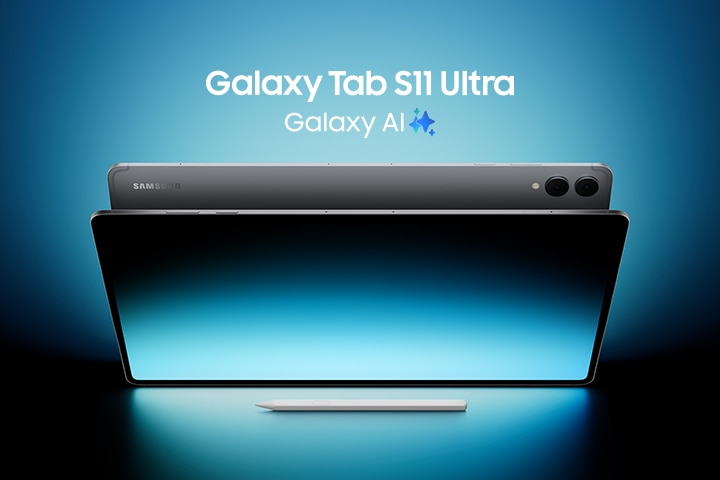
Samsung Galaxy Tab S11 Series: The Ultimate Friendly Guide

After analyzing everything across the internet and gathering real-world insights, the Bhussan.com team shares this friendly, helpful article.
Introduction
Ever found yourself scouring the internet, trying to sift through specs and offers, wondering which Samsung tablet deserves your money and attention? You’re not alone! That’s exactly what we did—and after diving deep, here’s your no-fluff, heart-to-heart guide to the Samsung Galaxy Tab S11 Series. You’ll get reasons to smile (and maybe the urge to pre-order).
1. What Makes the Samsung Galaxy Tab S11 Series Special?
Let’s start with the excitement-first approach—why is everyone buzzing about this lineup?
Picture this: you’re balancing work, study, art, and binge-watching—all on one sleek device. The Tab S11 and S11 Ultra aren’t just flashy upgrades; they feel like your creative partner and productivity ally in one.
What’s new?
-
AI-first software: Meet Galaxy AI baked into One UI 8 on Android 16. We’re talking smart summarization, handwriting-to-text magic, and auto suggestions while you draw or write.
-
S Pen rebooted: A cone-tip nib meets a grip-friendly hex barrel. Sketching or note-taking? Feels snappier, more precise.
-
DeX Extended Mode: Hook it up to a monitor, and suddenly your tablet becomes a dual-screen workstation. Drag apps, expand views—it’s a mini-PC, but sleeker.
-
Brighter, shinier displays: Dynamic AMOLED 2X panels with insane brightness and anti-glare coating. Outdoors? No issue.
-
Totally portable or big-canvas options: 11-inch for mobility, 14.6-inch Ultra for that near-laptop vibe.
2. India Pricing Breakdown & Pre-Order Perks
Money talks. India pricing and perks—no guesswork.
| Model | Variant (RAM/Storage) | Price (₹) |
|---|---|---|
| Tab S11 (Wi-Fi) | 12GB / 128GB | 80,999 |
| 12GB / 256GB | 85,999 | |
| 12GB / 512GB | 96,999 | |
| Tab S11 (5G) | 12GB / 128GB | 93,999 |
| 12GB / 256GB | 98,999 | |
| Tab S11 Ultra (Wi-Fi) | 12GB / 256GB | 1,10,999 |
| 12GB / 512GB | 1,21,999 | |
| Tab S11 Ultra (5G) | 12GB / 256GB | 1,24,999 |
| 12GB / 512GB | 1,35,999 |
Perks to know:
-
Free 45W travel adapter
-
Bank offers up to ₹10,000 instant discount
-
Student + exchange bonuses (up to ₹6,000)
-
No-cost EMI & extended EMI options
3. Features Deep Dive: Why It Matters to You
Alright, let’s go into cozy chat mode—like I’m sipping chai with you, telling you why each feature is a game-changer.
Display & Design
-
Size matters, but choice matters more. 11″ is light, fits perfectly into bags—portable. The Ultra? That giant canvas is perfect if drawing, editing, or multi-tasking is your jam.
-
Dynamic AMOLED 2X—colours pop, blacks stay velvety, and HBM (High Brightness Mode) gives you 1600 nits peak brightness. Outdoor reading? No squinting needed.
Performance & Battery
-
The 3nm-class MediaTek Dimensity 9400+ chip brings serious AI and performance muscle. Need to sketch, transcribe, run mid-size games? Breezy.
-
Battery: ~8,400 mAh (S11) and ~11,600 mAh (Ultra). 45W fast-charge means under an hour to full juice—great if you’re always on the move.
Software & Productivity
-
Galaxy AI helps you summarize meeting notes, clean up readers for distraction-free articles, or correct grammar while you’re messaging—all while you’re brewing coffee.
-
Improved S Pen feels more precise than ever; tilt shading and less wobble make it smoother for sketches and handwriting.
-
DeX Extended Mode turns the tablet+monitor into a dual-screen productivity hub—drag photos, work on your email, and side-scroll your to-do list—all without switching devices.
4. Who Should Buy Which Model?
Let me paint a few “you” scenarios—because personalization matters.
-
You’re a student or note-taker: Go for the standard Tab S11 (11″). Light, includes S Pen, great for reading, writing and long hours of college or study.
-
You’re a creator or digital artist: The S11 Ultra is your digital sketchbook. More screen space, better for multi-app workflows (drawing plus reference plus browser).
-
You’re a hybrid worker or frequent flyer: The standard S11 + Book Cover Keyboard Slim = a portable workstation that fits in any airline tray. Add DeX, and you’re nearly a laptop away from your backpack.
-
You just want the best tablet money can buy: The Ultra (especially with 5G) gives you the most power, screen, and future-proofing.
5. Pros & Cons Table
Let’s clear the clutter—what’s awesome, and what you might pause on?
| Pros | Cons |
|---|---|
| Vibrant AMOLED 2X display – bright, sharp, HDR ready | Premium pricing – stretches well into the ₹1 lakh+ range |
| Galaxy AI tools + DeX – real productivity boost | Slightly hefty (Ultra) – ~692 g may feel big for some |
| Improved S Pen included – great drawing & note-taking | Accessories sold separately – keyboard, cover, extra cost |
| Impressive battery life + fast charging | AI features vary by region – may need a Samsung Account |
| Expandable storage (microSD) – up to 2 TB | 5G only sub-6 – no mmWave (limited in India network use) |
6. FAQs — Your Curiosity Covered (30+ Questions)
Here’s where the article turns into your personal FAQ treasure trove:
-
Is the S Pen included in the box?
Yes, both Tab S11 and S11 Ultra include the redesigned S Pen with the cone tip. -
What’s Galaxy AI, and do I get it in India?
Galaxy AI offers features like summarization, writing assist, and more. It’s included with One UI 8/Android 16—availability may vary and may require a Samsung Account. -
Can I expand the storage?
Yes—microSD expansion up to 2 TB is supported on select models. -
Does it support DeX?
Absolutely—DeX now supports Extended Mode, letting you use two screens seamlessly. -
Battery life—how long will it last?
Expect all-day battery on both models—8,400 mAh or 11,600 mAh—plus fast charging. -
Is 5G available in India?
Yes, but only Sub-6 support—no mmWave here yet. -
How bright is the screen outdoors?
Extremely bright—up to 1600 nits with High Brightness Mode and anti-reflection coating. -
Can I draw professionally with the S Pen?
Yes—it’s optimized for precision, tilt shading, and feels natural, especially for artists. -
Can it replace a laptop?
For light productivity, yes—especially with DeX and optional keyboard—but heavy video editing or development work might still need more power. -
Is there a keyboard?
Yes—the Book Cover Keyboard Slim is a perfect accessory (sold separately). -
Do I need a Samsung Account for features?
Some AI features may require it—worth setting up for full access. -
What’s the best model for students?
Tab S11 (11″)—light, includes S Pen, ample storage, and portability. -
How much does the Ultra weigh?
Around 692 g (Wi-Fi)—noticeable, but balanced for its 14.6″ screen. -
Does it support Wi-Fi 7?
The Ultra supports Wi-Fi 7 in select markets—India’s availability may vary. -
Are there discounts during festivals?
Historically, yes—look out for Diwali, Holi, and launch window offers. -
Can I share files easily?
Yes—Quick Share works across the Samsung ecosystem. -
Is it worth waiting for next-gen tablets?
Unless you need bleeding-edge features, the S11 series already packs future-ready innovations. -
How’s the sound quality?
Top-notch—quad speakers tuned by AKG, loud and clear for media or calls. -
Can I make calls on this tablet?
Wi-Fi models support video calls via apps. Cellular 5G variants can support voice calls via carrier or VoIP. -
What charger is bundled?
A 45W travel adapter is included during the pre-order period. -
Will it receive Android upgrades?
Likely 3–4 years of updates—we’ve come to expect Samsung’s extended support. -
Any foldable tablet coming?
Nothing announced yet—but the S11’s features may trickle into future devices. -
Does it support stylus tilt?
Yes—the redesigned S Pen supports tilt shading and better tracking. -
What’s the cooling like?
Samsung’s thermal architecture keeps it cool during heavy use or Dex mode. -
Any color options?
Typically comes in Titanium Grey and Cream (check local releases). -
Is it water-resistant?
Yes—it carries an IP68 rating (professional-grade protection). -
Can I use Note-taking apps like GoodNotes?
Definitely! Full compatibility—and many apps offer bundled deals at launch. -
Can I edit 4K videos smoothly?
4K editing is possible, especially on the Ultra, but avoid stacking too many effects if you’re on the go. -
Can it mirror my phone?
Yes—Samsung’s Continuity or DeX wireless mode lets you mirror or control your phone. -
Why choose S11 over S10?
Brighter display, AI features, faster chip, improved pen, DeX enhancements, and newer design.
7. Conclusion & Friendly Sign-Off
Whew—that was quite the ride, wasn’t it? Here’s the quick heart-to-heart summary:
-
The Samsung Galaxy Tab S11 Series is a serious leap forward—AI software, snappy performance, and productivity tools make it feel more than “just another tablet.”
-
India pricing is premium, but pre-order deals, discounts, and offers make it much more tempting.
-
Choose the 11″ model if you want something light, portable, and versatile. Choose the Ultra if you’re all about screen real estate and creative power.
If you’ve stuck around, here’s your CTA: think about how you use your tablet. For note-taking, sketching, or reading—I’d say the Tab S11 could soon become your best buddy. For creating or beating the laptop replacement? The Ultra is waiting with that massive canvas.
I’m excited to hear what you choose! Let’s keep chatting—drop your thoughts, the model you’re leaning toward, or any questions you want me to cover next.