
🎯Attention-Grabbing
Have you ever looked at your XR device and thought, “Wow… is this really the future?”
Because honestly, that’s exactly what I felt the first time I saw Android XR’s newest features in action. The sheer jump in creativity, connectivity, and realism is something most people would literally search the entire internet for—and still not fully understand.
So instead of leaving you lost in a maze of tech jargon, let’s break it all down in the simplest, most friendly way possible.
👉 After analyzing everything across the internet and gathering real-world insights, the Bhussan.com team shares this friendly, helpful article just for you.
Sit back… this is the complete guide you’ve been waiting for.
🧠Android XR Innovation — How Google and Samsung Are Quietly Rewiring the Future of Immersive Computing
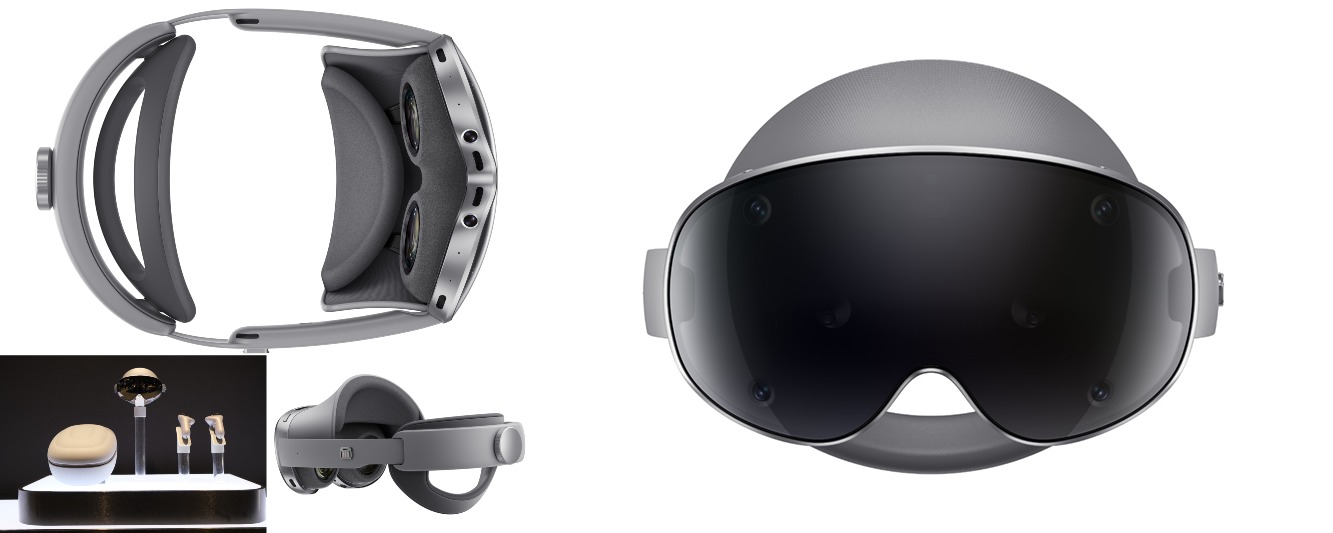
Have you ever held a piece of technology and felt like you were holding the beginning of something big? That’s the vibe many people are getting from the new wave of Android XR innovation powering the Galaxy XR ecosystem.
What’s fascinating is how naturally it all blends. A few years ago, XR felt experimental—like something that belonged in a tech lab. But today? It feels personal. Comfortable. Almost… human.
Android XR’s latest innovations have pushed the boundaries in three major ways:
🔥 1. Android XR Innovation Boosts Productivity with PC Connect
Imagine pulling your laptop screen into the air, placing it anywhere in your room, and surrounding yourself with floating apps. Not science fiction. Real. Today.
🎭 2. Android XR Innovation Brings Your Virtual Self to Life with Likeness
Your avatar no longer needs to look like a cartoon from 2010. With Likeness, you can finally bring your actual personality into XR—your smile, your vibe, your identity.
✈️ 3. Android XR Innovation Makes Mobility Easy with Travel Mode
Ever tried using XR during a commute? Motion blur… nausea… battery crying for help. Travel Mode fixes that by tuning the entire system for movement, low signal, and real-life unpredictability.
What do I love most?
These features don’t feel forced. They feel like natural extensions of how we already live and work. Google builds the ecosystem, Samsung builds the hardware, and together they’re quietly shaping the next generation of immersive tech.
This isn’t just an upgrade.
It’s the beginning of XR becoming as normal as using your smartphone.
🖥️PC Connect — Turning Your Entire Room Into a Productivity Playground
Let me be real with you: PC Connect might be the feature that actually convinces people that XR is more than gaming.
If you’ve ever struggled with tiny laptop screens, cramped windows, or multitasking nightmares—this is the dream solution. With PC Connect, your XR headset becomes a limitless workspace where you can:
-
Pull your PC screen into the air
-
Open multiple virtual monitors
-
Place apps anywhere in your room
-
Type, drag, and click like normal
It’s productivity without boundaries.
But the magic is not just in the visuals—it’s how natural it feels.
You don’t need to learn new controls. You don’t need special software. Your computer simply becomes bigger, more flexible, and more immersive.
Imagine this scenario:
You’re editing a video. Your timeline is stretched across the wall.
Your scripts float next to your desk.
A browser window sits up high for reference.
Suddenly, you’re not fighting your screen—you’re dancing with it.
What’s even more interesting is how PC Connect blends your physical and digital environments. You can pin windows to a wall, place documents beside your coffee mug, or keep your workspace organized around your real room.
This isn’t tech for tech’s sake.
This is XR finally making sense for everyday work.
🎭Likeness — When Your Avatar Finally Looks Like You
Let’s be honest—most avatars today look like emojis with legs. Cute, but not exactly… you.
This is where Likeness enters the chat and instantly changes the whole vibe of XR identity.
Likeness is basically your personal digital clone generator (in a good way!).
You take a few photos, and boom—Android XR builds a realistic 3D head model that actually resembles you. Not generic. Not plastic. Not uncanny.
Just you, but digital.
Why does this matter?
Because we’re entering a future where meetings, hangouts, creative sessions, and even daily tasks will happen in immersive spaces. And people want to show up as themselves.
Here’s what Likeness improves:
-
✔ Better communication
-
✔ More personal expression
-
✔ More confidence in XR spaces
-
✔ More trust in virtual interactions
And it’s surprisingly emotional.
Seeing a digital version of yourself look back at you? It’s a moment. A weird-but-cool moment.
But it’s not just about realism.
You can stylize your look, add creative flair, switch tones, change outfits, and match the vibe you’re going for—professional, casual, sci-fi, retro, anything.
Likeness makes XR human.
It bridges the gap between virtual presence and real identity.
✈️Travel Mode — Finally, XR That Moves With You
Have you ever tried using XR on a train or bus?
Yeah… not great.
Shaking.
Jittering.
Battery meltdown.
Sensors are panicking like they missed their morning coffee.
Travel Mode fixes all of this in one brilliant move.
Think of it as “XR for real life.”
When you turn it on, your Galaxy XR automatically adjusts:
-
✔ Motion sensors (to reduce nausea)
-
✔ Rendering performance (to save battery)
-
✔ Network features (to support weak signals)
-
✔ UI layout (simplified for quick use)
This means you can:
-
Watch movies during flights
-
Read documents during commutes
-
Check navigation without removing your headset
-
Use apps without lag or motion sickness
It’s XR… but practical.
XR that respects your time, your battery, and your motion.
Travel Mode is the unsung hero of this update because it answers a real-world problem:
How do we make immersive tech useful outside your living room?
Finally, we have a solution.
📊Pros & Cons of Android XR Innovation
| Pros | Cons |
|---|---|
| Extremely immersive, life-like experience | Requires compatible hardware |
| Makes productivity easier via PC Connect | Learning curve for new users |
| Realistic avatars with Likeness | Privacy management required |
| Travel Mode improves mobility | Battery usage still depends on tasks |
| Strong integration with the Galaxy ecosystem | Early-stage ecosystem |
❓30+ FAQs About Android XR Innovation
-
What is Android XR Innovation?
A set of new features improving XR usability, realism, and connectivity. -
Is Android XR only for Galaxy XR devices?
No, but Galaxy XR currently showcases it best. -
What is PC Connect?
A feature that brings your PC into XR as multiple floating screens. -
Can I use PC Connect for work?
Absolutely — it’s designed for productivity. -
Does Likeness create a real 3D version of my face?
Yes, a realistic avatar that reflects your identity. -
Is Likeness safe?
Yes, with consent-based controls and secure processing. -
Does Travel Mode save battery?
Yes, it reduces system load to last longer. -
Can I use XR on a train with Travel Mode?
Yes — that’s the exact purpose. -
Is Android XR good for beginners?
Yes, surprisingly intuitive. -
Can I play games with these features?
Of course, games benefit a lot from the improvements. -
Is it like Apple Vision Pro?
Similar concept, different ecosystem. -
Do I need fast internet?
Not always—Travel Mode supports offline usage. -
How real does Likeness look?
Very realistic but customizable. -
Does PC Connect lag?
Minimal lag if your PC is strong and the connection is stable. -
Can I use a Bluetooth keyboard in XR?
Yes, highly recommended. -
Is this update free?
Yes, it’s software-based. -
Does it support hand tracking?
Yes, fully compatible. -
Is it good for meetings?
Perfect, especially with realistic avatars. -
Does XR cause eye strain?
Less than before, thanks to optimizations. -
Can kids use XR?
With supervision and limited time. -
Does XR replace laptops?
Not yet, but it expands what laptops can do. -
Is it heavy on the battery?
Depends on usage, but Travel Mode helps a lot. -
Can I watch movies?
Yes — feels like a personal cinema. -
Is depth realistic?
Very — thanks to improved sensors. -
Can I browse the internet in XR?
Yes, with floating windows. -
Does Android XR support 3D apps?
Yes, OpenXR-based apps run smoothly. -
Is it good for drawing or designing?
Great for creative tasks. -
How accurate is motion tracking?
More stable than previous versions. -
Does Galaxy XR support glasses wearers?
Yes, with space for optics. -
Will XR replace smartphones someday?
Maybe—not now, but who knows? -
Is Android XR future-proof?
Yes, updates roll out regularly.
🏁 Conclusion
If there’s one thing I learned while researching Android XR innovation, it’s this:
XR isn’t trying to replace your tech — it’s trying to enhance your life.
PC Connect boosts your productivity.
Likeness boosts your identity.
Travel Mode boosts your mobility.
Together, they make Galaxy XR not just a device…
but a glimpse into the next era of digital living.
If you’re excited about the future of immersive tech, trust me — this is only the beginning.
🎯 CTA (Call-to-Action)
Want more guides like this?
Bookmark Bhussan.com and join us for the next deep dive into the future of tech 🚀