

Lenovo Legion Go 2 Review 2025 — Is It Worth $1,099? 🤔
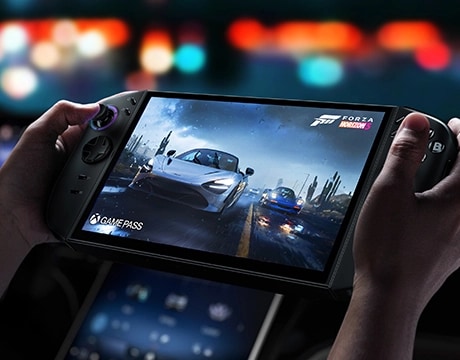
🎯 Introduction: A Handheld That Costs More Than a PS5?!
Have you ever stared at a new gadget and thought, “Wait… do I really need this in my life, or does the shiny OLED display just hypnotize me?” 😅
That’s exactly the kind of reaction the Lenovo Legion Go 2 is sparking. At a starting price of $1,099, it’s no budget-friendly Steam Deck. But here’s the thing — it’s packing features gamers have been begging for: OLED screen, drift-proof hall-effect joysticks, dual USB4 ports, and a battery that doesn’t cry for help after 90 minutes.
So, is this handheld beast worth breaking the bank for? Or is it just another fancy toy?
👉 After analyzing everything across the internet, checking early reviews, and gathering real-world insights, the Bhussan.com team shares this friendly, no-BS review.
Let’s dive in, friend. 🚀
⚡ Specs and Features — What’s New in 2025?
The Legion Go 2 isn’t just a copy-paste of the 2023 model. Lenovo listened, tweaked, and upgraded. Let’s break it down like we’re chatting over coffee. ☕
-
Display:
-
Old: 8.8” IPS, 2560×1600, 144Hz
-
New: 8.8” OLED, 1920×1200, 30–144Hz VRR
-
Translation? Deeper blacks, punchier colors, smoother gameplay, even at 40 FPS.
-
-
Processor (APU):
-
AMD Ryzen Z2 / Z2 Extreme (Zen 4 refresh, RDNA 3 GPU)
-
Slightly better efficiency → means cooler & longer-lasting gaming.
-
-
Memory & Storage:
-
Up to 32GB LPDDR5X-8000 RAM
-
Up to 2TB NVMe SSD (M.2 2242)
-
MicroSD expansion (yes, emulation fans, you’re safe 😏).
-
-
Battery:
-
From 49Wh → 74Wh (finally!).
-
Expect 3–6 hrs of indie gaming, 2–3 hrs for AAAs at mid settings.
-
-
Controllers:
-
Hall-effect joysticks (drift-proof 🙌)
-
Redesigned pivot-disc D-pad
-
FPS Mode (right controller doubles as a vertical mouse).
-
-
Weight & Build:
-
Around 920g (2.03 lb) with controllers.
-
Slightly heavier than before, but better ergonomics.
-
📊 Quick Specs Table
| Feature | Legion Go 1 (2023) | Legion Go 2 (2025) |
|---|---|---|
| Display | 8.8” IPS, 2560×1600, 144Hz | 8.8” OLED, 1920×1200, 30–144Hz |
| Processor | AMD Z1 Extreme | AMD Z2 / Z2 Extreme |
| RAM | 16GB LPDDR5X-7500 | Up to 32GB LPDDR5X-8000 |
| Storage | Up to 1TB NVMe | Up to 2TB NVMe + microSD |
| Battery | 49Wh | 74Wh |
| Weight | 854g | 920g |
💰 Price & Availability — Ouch, That’s Expensive!
Let’s talk money 💸 — because for most of us, that’s the deciding factor.
-
Europe: Starts at €999
-
US: Early reports suggest $1,049–$1,099 for base model
-
Top Configs: $1,300–$1,479 for Z2 Extreme + 32GB RAM + 2TB SSD
-
Release: September 2025 in Europe, October in North America
Now, compare that with the Steam Deck OLED ($549–$649) or ROG Ally X (~$799), and you realize Lenovo isn’t playing the “budget” game. They’re targeting enthusiasts who want premium features, no compromises.
Question is: Are you one of those people who will happily pay double just for OLED and a bigger battery? 🤨
🎮 Real-World Performance — Does It Deliver?
Specs are great on paper, but how does it actually feel in your hands?
Here’s the deal:
-
At 1200p resolution, you’re not pushing as many pixels as before, which is actually a blessing. Games run smoother.
-
Expect 40–60 FPS in most modern games at medium settings (with power draw at 15–20W).
-
Thanks to VRR (variable refresh rate), even if frames dip, gameplay still looks smooth.
Battery tests (real-world estimates):
-
Retro/Indie games → 4–6 hrs
-
AAA games at medium → 2–3 hrs
-
High settings, uncapped FPS → 1–2 hrs (say goodbye to battery 🪫).
Noise levels? Quieter than the first-gen, thanks to improved thermals.
👉 In short: It’s not a miracle machine, but it’s one of the smoothest Windows handhelds right now.
✅ Pros & ❌ Cons of Legion Go 2
| Pros 👍 | Cons 👎 |
|---|---|
| Stunning OLED display with VRR | High price ($1,099+) |
| Bigger 74Wh battery | Still heavier than competitors |
| Hall-effect sticks (no drift) | Windows handheld quirks (drivers, scaling) |
| Dual USB4 ports (top & bottom) | Steam Deck OLED is half the price |
| 32GB RAM & 2TB SSD options | Thicker & bulkier than ROG Ally |
| Fingerprint reader + better ergonomics | The battery is still not enough for hardcore AAA sessions |
📚 30+ FAQs -Your Burning Questions Answered 🔥
Q1. What is the Lenovo Legion Go 2 price in the US?
👉 Starts around $1,049–$1,099 depending on SKU.
Q2. Is the Legion Go 2 worth it over the Steam Deck OLED?
👉 If you care about OLED + Windows flexibility, yes. If you want value, Steam Deck wins.
Q3. Can I upgrade the SSD?
👉 Yes, it uses M.2 2242 NVMe drives.
Q4. Does it have joystick drift?
👉 No. Hall-effect sticks prevent drift.
Q5. How heavy is it compared to a Switch OLED?
👉 Switch OLED = ~420g. Legion Go 2 = ~920g. Nearly double.
Q6. How long does the battery last?
👉 2–6 hours depending on the game.
Q7. Can it run Cyberpunk 2077?
👉 Yes, but expect 40–50 FPS at medium settings, 1200p.
Q8. Does it support external GPUs (eGPUs)?
👉 Yes, via USB4.
Q9. Does it come with SteamOS?
👉 No, Windows 11 only.
Q10. Can I install Linux/SteamOS manually?
👉 Yes, but requires tinkering.
Q11. Does it have VRR (variable refresh)?
👉 Yes, 30–144Hz.
Q12. Is it heavier than Legion Go 1?
👉 Yes, about 66g heavier.
Q13. Does it have a fingerprint reader?
👉 Yes, built into the power button.
Q14. Is the OLED display brighter?
👉 Yes, 1000-nit peak brightness.
Q15. Can I use Xbox Game Pass on it?
👉 Yes, it’s Windows.
Q16. Does it have HDR support?
👉 Yes, with OLED TrueBlack certification.
Q17. Is it bigger than ROG Ally?
👉 Yes, bulkier but better battery.
Q18. What’s the refresh rate max?
👉 144Hz.
Q19. Is 32GB RAM necessary?
👉 Not for most games, but useful for multitasking.
Q20. Can I dock it to a TV/monitor?
👉 Yes, USB4 makes docking easy.
Q21. Does it support VR?
👉 Technically yes, but not ideal.
Q22. Does the controller detach wirelessly?
👉 Yes, works detached via wireless.
Q23. How long does it take to charge?
👉 0–70% in about 30 minutes (Rapid Charge).
Q24. Is it quieter than the first Legion Go?
👉 Yes, improved cooling system.
Q25. Does it have haptic feedback?
👉 Yes, refined vibration motors.
Q26. Can I install mods?
👉 Yes, it’s Windows — go wild.
Q27. Can it emulate Switch/PS2 games?
👉 Yes, with emulators, performance is solid.
Q28. Is the D-pad good now?
👉 Much better — pivot-disc design fixes diagonals.
Q29. Can I play offline?
👉 Yes, full offline support.
Q30. Will burn-in be an issue with OLED?
👉 Rare, but Lenovo includes pixel-shift tools.
🎤 Conclusion — Should You Buy the Legion Go 2?
Here’s the truth: The Lenovo Legion Go 2 is not for everyone. It’s pricey, bulky, and still carries Windows headaches. However, for gamers who crave OLED glory, improved battery life, drift-proof sticks, and dockable flexibility, this is one of the best handhelds of 2025.
If money’s tight → go for the Steam Deck OLED.
If you want premium → Legion Go 2 is your pick.
👉 So, what about you? Would you drop $1,099 for a handheld that doubles as a mini gaming PC, or stick with something cheaper?