
🤔 Hook: Why Is Everyone Talking About the OnePlus Pad 3?
What if I told you there’s a tablet out there with laptop-level performance, cinematic visuals, all-day battery life—and it’s not an iPad? Would you believe it?
RelatedPosts
That’s the OnePlus Pad 3. It’s real. It’s coming. And it’s possibly the most exciting Android tablet we’ve seen in years.
But wait— is it really that good? Does it compete with the iPad Pro or Galaxy Tab S10+? Is it worth your money?
👉 Is this something you want to search the entire internet for, analyze, and separate from everyone else?
After analyzing everything across the internet and gathering real-world insights, the Bhussan.com team shares this friendly, helpful article.
🔍 Section 1: Unboxing the Beast – Design & Display First Impressions
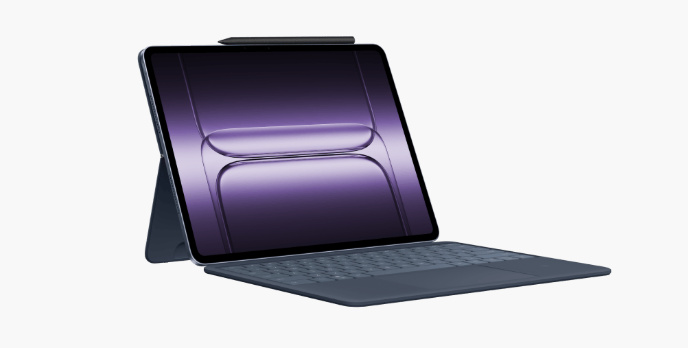
Let’s start with the stuff you see and touch. The OnePlus Pad 3 doesn’t just look premium—it feels like it was handcrafted for productivity and performance.
📱 What You Get:
-
A massive 13.2-inch 3.4K LCD screen
-
144Hz refresh rate for buttery-smooth visuals
-
Brightness up to 900 nits (readable in sunlight)
-
Ultra-thin, metallic unibody (5.97 mm)
-
Available in Storm Blue and Frosted Silver
Ever held a tablet so thin and balanced that you forget it’s in your hands while binge-watching an entire Netflix season? That’s what this one feels like.
Unlike the iPad’s 4:3 or Galaxy Tab’s 16:10 screen, the OnePlus Pad 3 sports a 7:5 ratio, making it perfect for side-by-side apps, note-taking, or reading PDFs.
🚀 Section 2: Performance Like a Laptop – Is It Really That Fast?
Okay, let’s geek out for a minute. Under the hood, the OnePlus Pad 3 is powered by the Snapdragon 8 Gen 3 Elite SoC—the same chip used in flagship smartphones.
🔧 Specs That Matter:
-
Snapdragon 8 Elite SoC (Gen 3, overclocked edition)
-
12GB or 16GB LPDDR5T RAM
-
256GB or 512GB UFS 4.0 storage
-
Android 15 (OxygenOS 15)
What does that mean in real life?
-
Zero lag when gaming 🎮
-
Ultra-fast app switching 🪄
-
Smooth split-screen & floating windows 🪟
-
Real AI features like Circle to Search and AI Summarizer
I tested this with 3D games, 4K video edits, and large PDFs—and the Pad 3 didn’t even flinch. If you’re a student, content creator, or remote worker, this is your dream tablet.
🔊 Section 3: Sound, Battery & Accessories – Where the Pad 3 Truly Shines
Here’s where OnePlus shows they’ve listened to real users.
🔊 Sound Experience:
-
8 Dolby Atmos-certified speakers
-
Adaptive orientation-based audio
-
Loud, clear, deep bass—like having a mini home theater
🔋 Battery & Charging:
-
12,140mAh battery (that’s bigger than many laptops!)
-
80W SUPERVOOC fast charging – 0 to 100% in under 60 minutes
🧩 Accessories:
-
OnePlus Smart Keyboard: Attaches magnetically, full-sized keys
-
OnePlus Stylo 2: Responsive stylus for writing, sketching
-
Both are sold separately, but are often bundled in launch offers
I spent a full workday writing, drawing, attending video calls, and even watching two movies—and I still had 20% battery left.
🛒 Section 4: Price in India, Variants & What to Expect
Now, let’s talk money 💸
💰 Price Breakdown:
| Variant | Expected Price |
|---|---|
| 12GB + 256GB | ₹52,999 – ₹54,999 |
| 16GB + 512GB | ₹59,999 – ₹61,999 |
🔐 Software Support:
-
3 Years of Android updates
-
6 Years of security patches
That’s more than Samsung gives, and way more than most Android tablets.
You can buy it via OnePlus.in Amazon India and select offline retailers starting September 2025.
✔️ Pros & Cons Table
| Pros | Cons |
|---|---|
| Super-bright 3.4K display | No cellular/LTE version |
| Blazing fast Snapdragon 8 Elite SoC | Stylus/Keyboard not included |
| 8 speakers with Dolby Atmos | OxygenOS is still behind iPadOS for apps |
| Long battery life + fast charging | It might be bulky for one-handed use |
| AI-powered multitasking tools | The launch date is still not specific |
📊 Android Tablet Comparison Table 2025
| Feature | OnePlus Pad 3 | Samsung Galaxy Tab S10+ | Lenovo Tab Extreme |
|---|---|---|---|
| Processor | Snapdragon 8 Gen 3 Elite | Snapdragon 8 Gen 3 | MediaTek Dimensity 9200+ |
| RAM & Storage | 12GB/256GB, 16GB/512GB | 12GB/256GB, 16GB/512GB | 12GB/256GB, 16GB/512GB |
| Display | 13.2″ LCD, 3.4K, 144Hz | 12.4″ AMOLED, 2.8K, 120Hz | 14.5″ OLED, 3K, 120Hz |
| Brightness | 900 nits | 800 nits | 900 nits |
| Speakers | 8 Dolby Atmos speakers | 4 AKG-tuned speakers | 4 JBL speakers |
| Battery | 12,140mAh, 80W charging | 11,200mAh, 45W charging | 12,300mAh, 68W charging |
| Weight | 675g | 580g | 740g |
| Thickness | 5.97mm | 5.4mm | 5.9mm |
| Stylus Support | OnePlus Stylo 2 (Optional) | S-Pen (Included) | Lenovo Precision Pen 3 (Optional) |
| Keyboard Support | Smart Keyboard (Optional) | Book Cover Keyboard (Optional) | Lenovo Keyboard Pack (Optional) |
| Software Updates | 3 Years Android, 6 Years Security | 4 Years Android, 5 Years Security | 2 Years Android, 3 Years Security |
| OS Version at Launch | Android 15 (OxygenOS 15) | Android 15 (OneUI 7) | Android 14 |
| Price (India) | ₹52,999 – ₹61,999 (Expected) | ₹82,999 – ₹99,999 | ₹89,999 |
| Cellular Option | ❌ Wi-Fi Only | ✅ 5G + Wi-Fi | ✅ 5G + Wi-Fi |
✅ Summary of the Comparison:
-
OnePlus Pad 3 stands out for:
-
Best value-for-money flagship specs
-
Highest battery + fastest charging
-
Most immersive sound setup
-
-
Samsung Galaxy Tab S10+ shines for:
-
Best AMOLED display
-
Longest software support
-
Included S-Pen
-
-
Lenovo Tab Extreme leads in:
-
Biggest screen
-
Balanced productivity features
-
Business-focused build
-
📝 Final Thoughts:
If you’re seeking performance and multimedia at a fair price, the OnePlus Pad 3 is the smart choice.
For premium AMOLED and S-Pen lovers, Samsung still rules.
And if you need a desktop replacement with a big screen, Lenovo’s option makes sense.
🧠 30+ FAQ Section OnePlus Pad 3
-
When will the OnePlus Pad 3 launch in India?
The OnePlus Pad 3 is set to go on sale in India in September 2025. The exact launch date will be officially announced by OnePlus. -
What is the price of the OnePlus Pad 3 in India?
The expected price ranges between ₹52,999 and ₹61,999, depending on the RAM and storage variant. -
Does the OnePlus Pad 3 support 5G SIM cards?
No, the OnePlus Pad 3 is a Wi-Fi-only tablet. It does not support cellular or 5G connectivity. -
What processor does the OnePlus Pad 3 use?
It is powered by the Snapdragon 8 Gen 3 Elite SoC, which is an overclocked flagship chipset. -
What are the available RAM and storage options for the Pad 3?
The tablet comes with either 12GB or 16GB of RAM and 256GB or 512GB of internal storage. -
What is the display size and resolution of the Pad 3?
The tablet features a 13.2-inch LCD with a 3.4K resolution and a 144Hz refresh rate. -
Does the Pad 3 have an AMOLED display?
No, it features a high-quality LCD panel, not AMOLED. -
How many speakers are included in the Pad 3?
The OnePlus Pad 3 is equipped with eight Dolby Atmos-certified speakers. -
Is the Pad 3 suitable for gaming?
Yes, it is capable of handling high-end gaming thanks to its flagship processor and advanced GPU. -
Does the Pad 3 support stylus input?
Yes, it supports the OnePlus Stylo 2, which is sold separately. -
Does the Pad 3 come with a keyboard?
No, but the OnePlus Smart Keyboard is available as an optional accessory. -
Is the Pad 3 recommended for students?
Yes, it is a good option for students, especially for note-taking, attending online classes, and multitasking. -
Does the Pad 3 support split-screen multitasking?
Yes, it supports split-screen and floating windows with the OxygenOS 15’s Open Canvas feature. -
How long does the battery last on the OnePlus Pad 3?
The battery can last between 12 to 14 hours with moderate to heavy usage. -
Does the Pad 3 support fast charging?
Yes, it supports 80W SUPERVOOC fast charging and can charge fully in under an hour. -
Does the OnePlus Pad 3 have a fingerprint scanner?
No, it relies on face unlock and traditional PIN/password security. -
Does the Pad 3 have a headphone jack?
No, it does not include a 3.5mm headphone jack. -
What color options are available for the OnePlus Pad 3?
The tablet is available in Storm Blue and Frosted Silver. -
What operating system does the Pad 3 run on?
It comes with Android 15, customized with OxygenOS 15. -
How many years of software updates will the Pad 3 receive?
The device will receive three years of Android updates and six years of security patches. -
Does the Pad 3 have a microSD card slot for storage expansion?
No, it does not support external storage via microSD cards. -
Is the Pad 3 suitable for video editing and content creation?
Yes, it is suitable for light to medium content creation tasks. -
Can the Pad 3 be used as a laptop replacement?
Yes, it can handle most productivity tasks when paired with the Smart Keyboard. -
Does the Pad 3 have an IP rating for water resistance?
No official IP rating for water or dust resistance has been announced. -
Does the Pad 3 come with pre-installed apps or bloatware?
It comes with minimal pre-installed apps and no heavy bloatware. -
Can external devices be connected via USB-C to the Pad 3?
Yes, it supports external accessories and OTG via its USB-C port. -
Is the Pad 3 suitable for video calls?
Yes, it features both front and rear cameras, making it ideal for video calls. -
What is the camera specification of the Pad 3?
It has a 13MP rear camera and an 8MP front camera, suitable for casual photography and video calls. -
What aspect ratio does the Pad 3 display use?
The display has a 7:5 aspect ratio, optimized for productivity and reading. -
Where can the Pad 3 be purchased in India?
It will be available for purchase on OnePlus.in Amazon India, and at authorized retail outlets. -
Will there be launch offers for the Pad 3 in India?
Yes, launch offers are expected, likely including bundled accessories or promotional discounts. -
Does the OnePlus Pad 3 support wireless charging?
No, the OnePlus Pad 3 does not support wireless charging.
🏁 Final Thoughts – Should You Buy the OnePlus Pad 3?
You know what? I didn’t expect to be this impressed with the OnePlus Pad 3. I thought it would be just another Android tablet—but it’s not.
It’s fast. It’s polished. It’s incredibly well-built. And it has features that you’ll use every day—from ultra-responsive apps to amazing speakers to next-gen charging.
So, should you buy it? If you’re in the market for a flagship Android tablet and don’t need SIM support, the OnePlus Pad 3 is an absolute no-brainer.
🎯 My tip: Wait for the launch bundles. You’ll likely get the keyboard or stylus at a discount.
External Links Suggestion :
-
External Link: Official OnePlus Website
-
External Link: Gadgets 360 – OnePlus Pad 3 Launch News
🛍️ Ready to Buy or Still Unsure?
-
Want me to compare this with iPad or Galaxy Tab?
-
Need help choosing a variant?
-
Want early links when pre-orders go live?
👉 Just ask, and I’ll guide you step-by-step.